
The envelope arrives, or the email comes through, and most parents do the same thing. They scan for a number, compare it to something they half-remember from last year, and either feel relieved or quietly worried. Neither response is wrong. But the report is carrying more information than that first glance suggests.
The score itself is less useful than where it sits. Since 2023, NAPLAN results are reported against four named proficiency levels, defined by ACARA: Exceeding (the result exceeds expectations at the time of testing), Strong (it meets challenging but reasonable expectations), Developing (working towards expectations), and Needs additional support (not yet achieving the expected outcomes). Note the wording of Strong. It is not a consolation prize; it means your child met an expectation the curriculum designers describe as challenging. Most children land in Developing or Strong, and that is where the majority of Australian students sit.
On the report itself, three marks matter. The black dot is your child’s result. The black triangle is the national average. The light shaded box is the range covering the middle 60 per cent of students nationally. If your child’s dot sits anywhere inside that shaded box, they are performing within the typical range for their year level. A dot near the bottom of the box and a dot near the top both count as within range. They are not the same, but neither is cause for alarm.
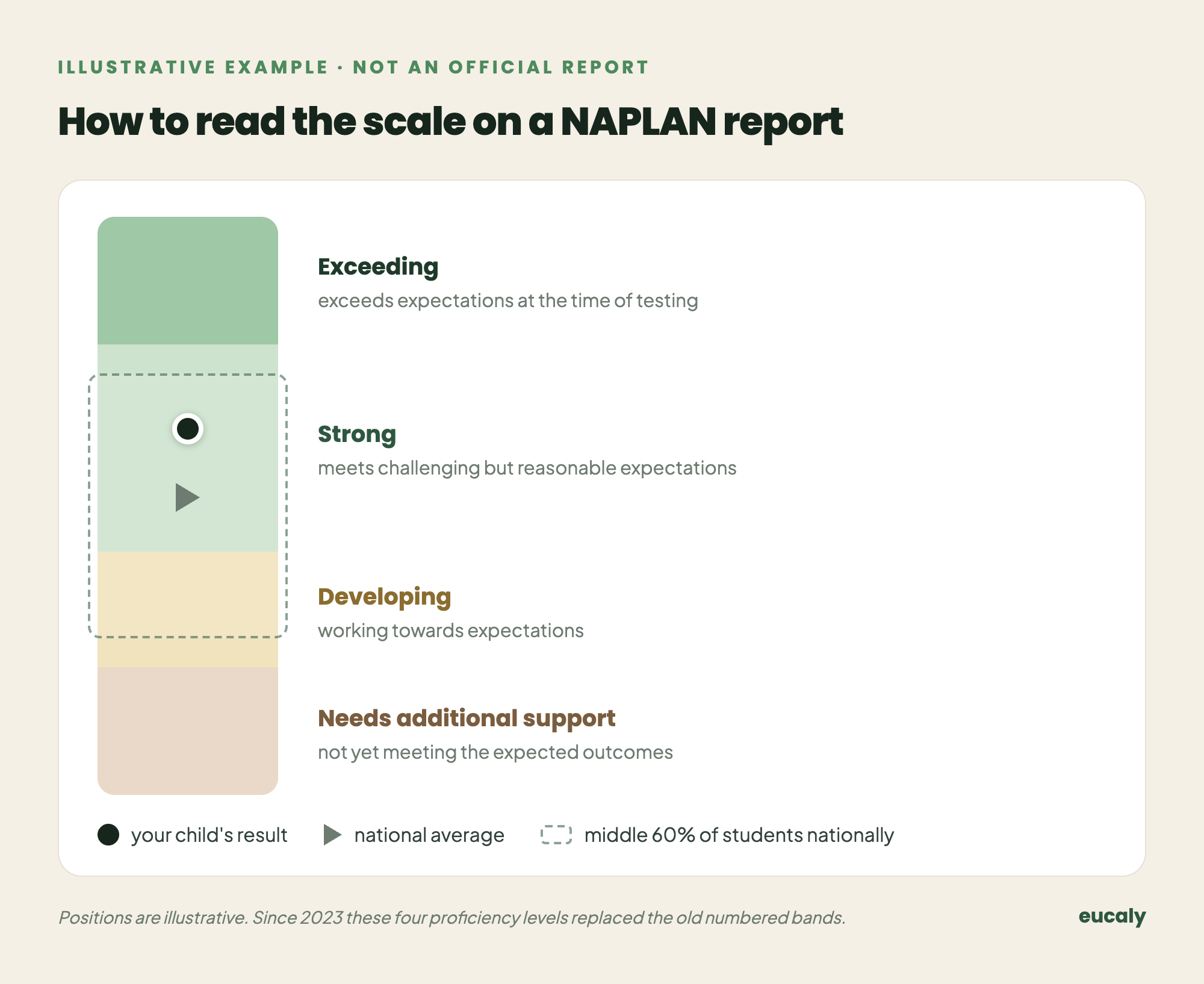
One caution when comparing: these proficiency levels only began in 2023, when they replaced the old numbered bands, and ACARA started a new measurement series at the same time. A result from 2023 onwards cannot be compared with the band numbers an older sibling brought home before then. The scales are different instruments.
The national average is a single point inside that shaded band. Parents often treat it as a threshold, as though sitting below it means something has gone wrong. It does not. Half of all students score below the average by definition. That is what an average is. The question worth asking is not whether your child is above or below the national average, but whether their result is consistent with how they have been going across the year.
Here is something the report does not tell you directly. A child can sit comfortably within the expected range and still have specific gaps that will quietly compound over time. Proficiency levels are broad. They tell you the general territory, not the terrain. A Year 5 student who scores solidly in numeracy might still be shaky on fractions while performing well on everything else. The overall band hides that. The detail does not show up unless someone is looking for it.
What parents often do with a result they do not like is reach for more content. More worksheets, more practice papers, more test preparation in the weeks before the next sitting. That is understandable. It is also usually the wrong lever to pull. NAPLAN measures what a child has retained and can apply under mild pressure. If the retention was not built steadily across the year, extra content in the final weeks rarely changes the outcome. It just raises anxiety.
What actually moves results over time is consistent, spaced practice across the domains the test covers. Reading, writing, numeracy, language conventions. Not all at once, and not in long sessions. Short daily contact with the material, spread across weeks and months, builds the kind of retention that shows up in a test environment. Children who practise this way do not just perform better. They forget less between sittings.
Eucaly is an Australian curriculum-aligned app for Years 3 to 9 that covers all four NAPLAN domains and gives parents a dashboard showing their child’s accuracy, strengths, and gaps by band, so the broad result becomes something you can actually act on.
The report is not a verdict. It is a snapshot taken on one morning, in one sitting, of a child who may have slept badly or rushed breakfast or found the reading passage genuinely difficult. Use it as one data point among several. Notice the pattern across years more than the number in any single year. And if something in the result surprises you, the most useful question is not what went wrong, but what has been practised consistently and what has not.
Keep it separate, too, from the school report in your child’s bag at the end of each semester. That one is teacher judgement on an A to E or descriptor scale, and it works quite differently; we unpack it in how to read your child’s Australian school report.
A NAPLAN result tells you where your child was. Daily practice is what shapes where they are going.